Example1
The following example shows a simulated thermostat and heater which maintains a temperature around 15C.
This, and other, example files can be found at:
https://github.com/bernie-skipole/inditest
In this example a NumberVector and NumberMember contain the temperature which is reported to the client:
import asyncio

import indipydriver as ipd

from indipyserver import IPyServer


class ThermalControl:
    """This is a simulation containing variables only, normally it
       would control a real heater, and take temperature measurements
       from a sensor."""

    def __init__(self, devicename, target=15):
        """Set start up values"""
        # It is useful to give this controlling object the devicename
        # reference, so it can be identified throughout the code
        self.devicename = devicename
        self.target = target
        self.temperature = 20
        self.heater = "Off"

    async def run_thermostat(self):
        """This simulates temperature increasing/decreasing, and turns
           on/off a heater if moving too far from the target."""
        while True:
            await asyncio.sleep(2)
            if self.heater == "On":
                # increasing temperature if the heater is on
                self.temperature += 0.1
            else:
                # decreasing temperature if the heater is off
                self.temperature -= 0.1

            if self.temperature > self.target+0.5:
                # too hot
                self.heater = "Off"

            if self.temperature < self.target-0.5:
                # too cold
                self.heater = "On"


class ThermoDriver(ipd.IPyDriver):

    """IPyDriver is subclassed here, which will
       run the thermalcontrol.run_thermostat() method
       and transmit the temperature to the client"""

    async def hardware(self):
        """This coroutine starts when the driver starts."""

        # get the ThermalControl object which actually runs the
        # instrument, and which is available in the named
        # arguments dictionary 'self.driverdata'.
        thermalcontrol = self.driverdata["thermalcontrol"]
        devicename = thermalcontrol.devicename

        # set the thermalcontrol instrument running
        self.add_background(thermalcontrol.run_thermostat())

        vector = self[devicename]['temperaturevector']
        while not self.stop:
            await asyncio.sleep(10)
            # Send the temperature every 10 seconds
            vector['temperature'] = thermalcontrol.temperature
            # and transmit it to the client
            await vector.send_setVector()


def make_driver(devicename, target):
    "Returns an instance of the driver"

    # Make an instance of the object controlling the instrument
    thermalcontrol = ThermalControl(devicename, target)

    # Make a NumberMember holding the temperature value
    # and set its current value from the thermalcontrol object
    temperature = ipd.NumberMember( name="temperature",
                                    format='%3.1f', min=-50, max=99,
                                    membervalue=thermalcontrol.temperature )
    # Make a NumberVector instance, containing the member.
    temperaturevector = ipd.NumberVector( name="temperaturevector",
                                          label="Temperature",
                                          group="Values",
                                          perm="ro",
                                          state="Ok",
                                          numbermembers=[temperature] )
    # Make a Device with temperaturevector as its only property
    # and with the given devicename
    thermostat = ipd.Device( devicename=devicename,
                             properties=[temperaturevector] )

    # Create the Driver which will contain this Device,
    # and the instrument controlling object
    driver = ThermoDriver( thermostat,
                           thermalcontrol=thermalcontrol )

    # and return the driver
    return driver


if __name__ == "__main__":

    # create and serve the driver
    # the devicename has to be unique in a network of devices,
    # so rather than statically setting it, the name and
    # initial target temperature could come from script arguments

    # in this case we'll set the devicename as "Thermostat",
    # and the target as 15

    # make a driver for the instrument
    thermodriver = make_driver("Thermostat", 15)
    # and a server, which serves this driver
    server = IPyServer(thermodriver)
    print(f"Running {__file__} with indipydriver version {ipd.version}")
    asyncio.run(server.asyncrun())
And the result, when connecting using indipyterm is:
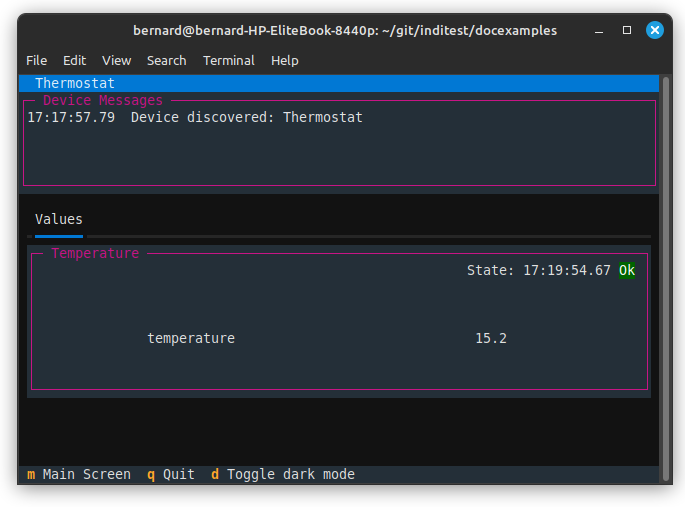
In summary. You create any objects needed to operate your hardware, and these can be inserted into the IPyDriver constructor and will be available in the dictionary of named arguments ‘driverdata’.
Note that coroutines in your objects can be set running as background tasks by calling the driver.add_background(coro) method.
When creating control objects, (the ThermalControl class above) it is convenient if they have a reference to their devicename, so that the name and control object is associated.
In a network of INDI devices, all devicenames must be unique, and though the devicename could be literally set throughout the code above, it is better to have it passed in to the devices in the make_driver() function, so this code can be reused.
You would typically create your own child class of IPyDriver, overriding methods:
async def rxevent(self, event)
To handle incoming calls from the client.
Note, in the above example the client only reads the temperature and does not send any data to set it, so it was not necessary to create this method.
async def hardware(self)
This runs when the driver or server asyncrun() method is called and is typically used to run a continuous long running task to send data to the client. Like all async tasks, this should be non blocking, so generally should include a call to await asyncio.sleep() in its loop.
Testing self.stop is also useful, as this stop flag is set to True when shutdown() is called on the driver, and would therefore stop this hardware while loop.
You would then create the IPyServer object to serve the driver, and run the server.asyncrun() co-routine.